Monday, December 14, 2015

PRESIDENT 2016


Grace Poe for President 2016


 I choose Grace Poe as a president his coming election because I do believe that she can do it. She can handle a big responsibility in our country because being a president is not an easy task. As far as know she came from a good family who trained her to become a good example not only for us to all the Filipino people. Before she decide to run a president she is a senator , so she has an experience on how to serve the people. She also know the problems that the country has encounter for how many decade and many she has temporary solutions regarding on that problem. Maybe she’s not perfect lady but still he can do things right and nothing is possible on her. Maybe she’s like his father, Fernando Poe Jr. who adapted her and became his father , who is known for his kindness to the Filipino’s during his time. As she say some of her interview’s that she don’t want to have many street children and other people who are physically and mentally abused especially the OFW’s. She want a peace surroundings. She also have many plans for the progress of the country. Many people believed that she can proved herself to become a good leader in our country. I know that she has the ability to think what is good for the welfare of the country. Many people also say that only man has the ability to handle a big responsibility to become a president but for me gender and nationality is the important as long as she has a good intension why she run for this position. Gender is not the basis of a person who are judgemental but the most important is , having a good heart and attitude and willing to serve the people with all her whole heart without expecting any in return. Because I do believed that LEADERSHIP IS NOT FOR POWER.

DESCRIPTION OF A PROCESS


HOW TO INSTALL WINDOWS 7


Learn How To Install Windows 7 on PC or Laptop. This is Step By Step Method For Beginners with screenshots. You can easily install windows 7 by below steps.


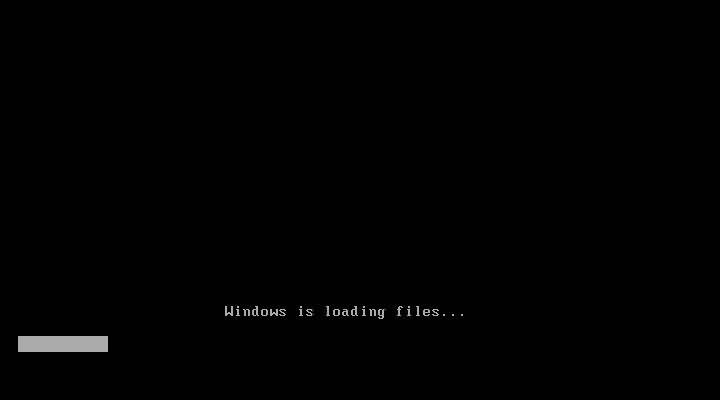
Step#1 Turn ON your PC and Press ‘F2’ Continuously. There will come up and option to boot through CD/DVD. Select that option. Windows will start loading its files.


Step#2 Now you will get the Windows Setup Window. This is the part to select Language for your windows. Select ‘English’ and click Next. Also there will be a ‘INSTALL NOW’ button. Click on it and proceed to next step.


Step#3 There will be a license agreement. Check on ‘I ACCEPT’ and proceed to NEXT. After that there will be an option to install windows. ‘UPGRADE’ and ‘CUSTOM’. Right now we are installing a clean version so Click on CUSTOM.


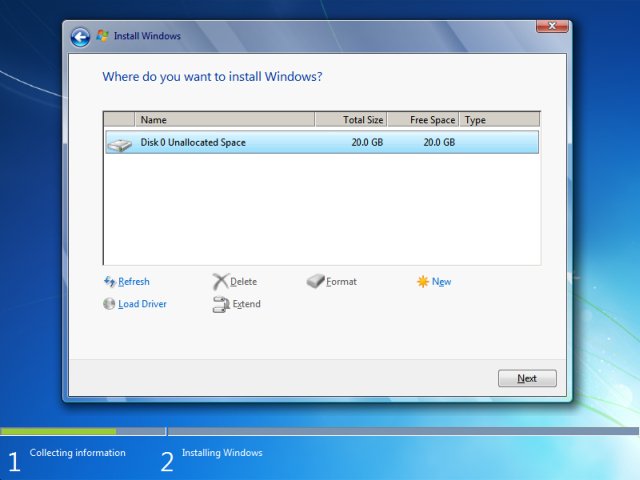
Step#4 In this step you will do partitioning of your drive. Be careful, this is the most important part of the Installation. In this you will allocate spaces to your drive. If you want to create a new drive, simply click on a drive and then click ‘NEW’. A new drive will be created.


Step#5 When you have created the drives, Simply Select the drive in which you want to install windows. Click ‘Format’, this will erase all the previous data on you that drive. Click on ‘NEXT’ to proceed.


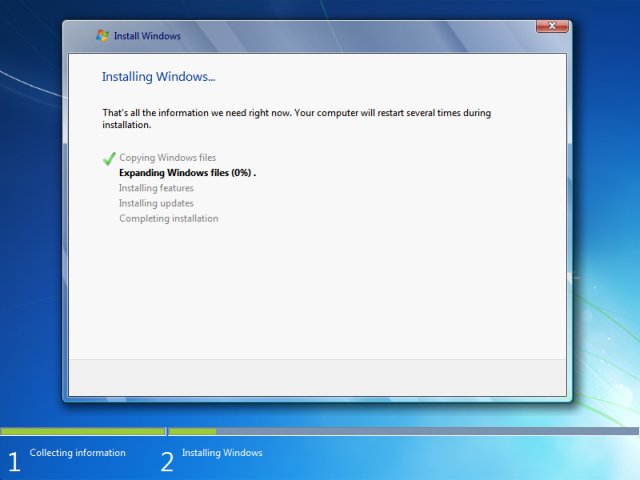
Step#6 Now you windows will start installing its files. Grab a cup of coffee and wait for a few minutes while it install. During this process don’t plug in or off your device. It might cause interruption and you might loose your data and have to begin the process all over again.


Step#7 Now when you files are installed. Your PC will be rebooted and now you will see is a ‘User Settings’ Screen. Simply add your Name and password and proceed to ‘NEXT’


Step#8 In this step you have to activate your windows. Simply look at the back of your Windows CD/DVD cover there will be a PRODUCT KEY. Add this key into your PC and Click ‘NEXT’.


Step#9 Now you have Installed you windows. Give the desired information the Windows Step guide will ask, like Time Zone, Update Timing and Your Computers location. There are three types of location. ‘WORK’, ‘PUBLIC’ and ‘HOME’. Select on anyone of the them according to your location. It only add sharing security according to your location.


Last Step – Congratulations:- You have installed you windows. Now you can see is your desktop. It is simple to use, setup your desktop and enjoy!


CREATED BY : 
Janeth  Antoque  ACT-2


Janeth Antoque